Elephant Insurance Mobile
- 3.8
- Rating
- 10.00K
- Installs
- Free
- Price

 Analysis by App-foxy
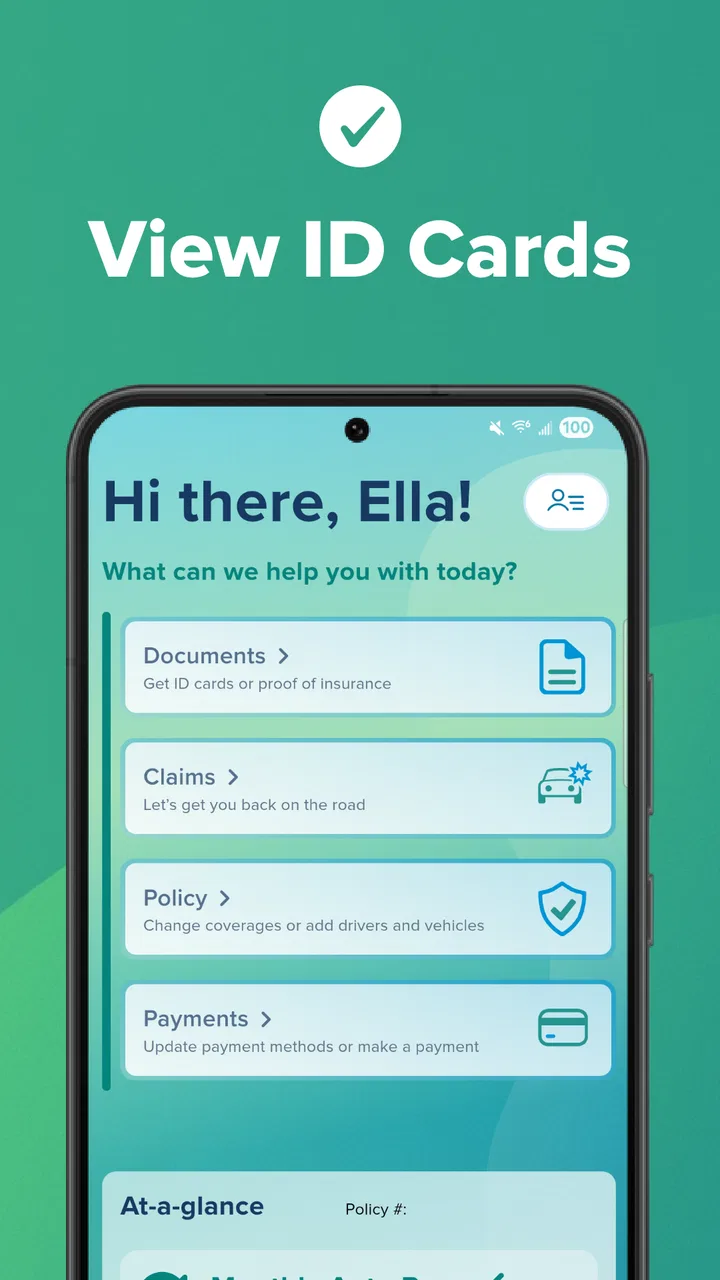
Managing car insurance is rarely something I want to turn into a long task. Most of the time, I need a quick answer while I am standing beside the car, checking paperwork before a trip, or trying to remember what my policy includes. Elephant Insurance Mobile is built around that practical need. It is a free Android app from Elephant Insurance in the Auto & Vehicles category, and its main purpose is to give customers a direct way to access their auto policy from a phone.
I approached it as a companion for existing Elephant customers rather than as a complete insurance-shopping tool. That distinction matters. The app is most useful when I already have a policy and want to reach its information without opening a desktop browser or searching through old messages. It is not trying to replace every conversation with an insurer, and I would not choose it if I were comparing several companies before buying coverage.
After using it as a policy-access tool, my overall impression is positive but deliberately measured. The experience makes routine access more convenient, especially for people who prefer keeping important documents on their phone. At the same time, convenience depends on having an Elephant policy and on remembering that an app shortcut is not the same thing as full customer-service support. The best way to use it is as a prepared reference point, not as the only place I rely on during an urgent incident.
You May Also Like

 Blood Strike: 2.5 Anniversary
Blood Strike’s Loadouts Turn Every Drop Into a Tactical Gamble
A close look at Blood Strike’s custom loadouts: how fast access to signature weapons reshapes its battle royale rhythm, rewards preparation, and narrows the gap between fights.

 Pandora - Music & Podcasts
Pandora’s Music Is Easy to Start, but Harder to Recover
Pandora’s strength is its low-effort path from a seed to a station. Its weak spot is how much confidence it asks you to place in connection, setup, and quiet recovery.

 8 Ball Pool
8 Ball Pool Is Built on Rivalries, Rematches, and Routine
A close look at the rivalries, rematches, shared routines, and unanswered safety questions that turn a quick pool match into a persistent mobile community.

 Samsung Music
Samsung Music’s Quiet Strength Is Playing What You Already Own
Its reach comes less from spectacle than from dependable access to a personal library. That simplicity is both the app’s strongest retention engine and its ceiling.

 AccuWeather: Weather Radar
AccuWeather Review: A Quick, Clear Forecast for Everyday Decisions
For everyday plans, the best forecast is the one you can understand quickly. AccuWeather makes rain timing, radar, and local conditions easy to act on, with a few trade-offs.

 Hill Climb Racing
Why Hill Climb Racing Still Turns Crashes Into One More Run
A tiny car, a bumpy hill and one more upgrade: Hill Climb Racing keeps resurfacing because its simple chaos makes every near-miss feel personal.
More From Our News Desk



How I use Elephant Insurance Mobile in a normal week
In a normal week, I’d use Elephant Insurance Mobile for a quick policy check rather than leave it open as a constant dashboard. I’d make a habit of confirming the relevant vehicle and account details after any insurance paperwork or real-life change, then keep the app ready for the occasional question on the go. That routine helps separate simple information retrieval from situations that need a conversation with the insurer.
A simple starting workflow for policy access
My first useful habit with this app is to open it before I actually need it. That sounds obvious, but insurance information tends to be requested at inconvenient moments: during a vehicle handover, after a minor incident, at a repair shop, or when someone else asks for proof that the car is covered. Signing in or checking the policy while calm is much easier than trying to solve access problems at the roadside.
Once I am inside, I treat the app as a focused dashboard for my relationship with Elephant Insurance. I look for the policy information I need, confirm that I am viewing the correct vehicle or account details, and then close the app rather than wandering through screens without a purpose. This small change makes the experience faster and reduces the chance of confusing an old document or a previous detail with the current policy.
The app’s value is therefore less about entertainment or discovery and more about reducing friction. Its store summary describes instant access to an auto policy, and that is the right expectation to set. I would not install it hoping for a broad driving assistant, fuel tracker, navigation system, or general vehicle-maintenance suite. Those are separate jobs. This one is focused on insurance access.
A realistic roadside scenario
Imagine that I am away from home and need to check my policy details after a low-speed parking-lot incident. I do not want to search through a filing cabinet, remember which email contains the document, or depend on another person’s phone. Having the insurer’s app already installed gives me a more direct route to the information connected to my account.
My practical advice is to use the app before the journey to make sure I know how to reach the relevant policy screen. I would also keep the phone charged and avoid assuming that every question about an accident can be answered inside the app. If the situation requires explanation, dispute handling, or immediate human guidance, the app should be treated as one part of the process rather than the complete solution.
This is one of the more important trade-offs. A digital policy reference is convenient, but it does not remove the need for judgment. I still need to record what happened, stay safe, and follow the insurer’s appropriate reporting process. The app can help me reach policy information, but it should not encourage me to delay urgent assistance or rely on a screen when the situation calls for a person.
Who gets the most from it
I think the app fits Elephant customers who regularly use their phone for documents and account management. It is particularly sensible for drivers who dislike carrying printed paperwork, people who move between vehicles or locations, and anyone who wants a single repeatable place to begin when checking insurance information.
It also suits users who are comfortable with a narrow-purpose app. Some insurance applications try to combine quotes, claims, driving feedback, roadside services, payment tools, and educational content. Elephant Insurance Mobile is easier to understand if I approach it with a smaller goal: open the account, reach the policy, and find the detail I need.
I would be less enthusiastic about it for someone who is not an Elephant customer, someone who wants to compare policies from multiple providers, or someone expecting a full financial-management experience. A general browser search or a comparison service may be more appropriate before choosing an insurer. Likewise, a phone call remains the better route when the issue is unusual, sensitive, or too complicated to resolve by reading policy information.
The settings and habits worth checking first
With an app like this, the most valuable “settings” are often the choices I make around access rather than a long list of advanced controls. I check that the app is installed on the phone I actually carry, that the account details are current, and that I can reach the policy area without experimenting during an emergency. I also pay attention to whether the displayed information matches the vehicle and coverage I expect before treating it as useful evidence.
Keeping the application updated is another sensible routine. The current version is 1.6.5, and the app requires Android 8.0 or later. That makes compatibility worth checking before recommending it to someone with an older device. An update can also be a good reminder to reopen the app and confirm that the sign-in path still feels familiar, rather than assuming a tool used once months ago will be ready at the exact moment I need it.
I would not turn notifications into background noise. If the app offers account-related alerts on a particular device, I would keep only the notifications that help me act. Too many unimportant prompts can make users dismiss everything, including something genuinely useful. The broader lesson is simple: configure the phone so that policy access is easy, but do not confuse constant alerts with better insurance management.
Small shortcuts that make repeat use better
The fastest pattern I found is to define the question before opening the app. Am I checking policy information, confirming a vehicle detail, or trying to understand what to do next? That decision prevents me from tapping randomly and makes the app feel more responsive even when the task itself is brief.
I also recommend creating a personal checklist outside the app for situations where insurance information may be needed. Mine would include the policy access route, the insurer’s contact method, vehicle details, and the steps I should take after an incident. The app can serve as the policy reference in that checklist, while the checklist prevents me from expecting the app to contain every emergency instruction.
Another useful habit is to check the account when something changes in real life. If I replace a vehicle, move house, alter how I use the car, or receive new policy paperwork, I would make a point of reviewing the digital account afterward. This does not mean the app itself performs every change; it means I use the app as a convenient place to verify what is currently associated with my policy and then contact Elephant Insurance when an update requires assistance.
For families, I would be careful about assuming that everyone should share one login or one phone. Insurance information can be personal, and convenience should not lead to careless account access. A better approach is to decide who genuinely needs the information and to keep the account protected on the primary user’s device. The app is useful because it is close at hand, which is also why basic phone security matters.
Where it differs from usual alternatives
The usual alternative is a mobile browser. A browser can be more flexible, especially if I need to visit several insurer websites or compare information across accounts. It may also be preferable on a computer when I am reviewing a long document. The dedicated app’s advantage is focus: I do not have to begin with a search engine, remember a web address, or navigate through unrelated tabs.
Printed documents have a different strength. Paper works without a battery, mobile signal, or an unlocked device, and some drivers still prefer having a physical backup in the glove compartment. The app is lighter and easier to keep current from a practical point of view, but I would not discard every backup simply because digital access is convenient.
Calling the insurer remains the strongest option when I need interpretation rather than retrieval. If I am unsure how a clause applies to a particular situation, or if an incident needs to be reported with context, a conversation can be more valuable than a clean screen. Elephant Insurance Mobile complements that route; it does not make human support unnecessary.
Limits I would keep in mind
The biggest limitation is its narrow audience. This is not a general-purpose insurance organizer for policies from different companies. Its usefulness begins with an Elephant Insurance relationship, so installing it before deciding on coverage would not give me much practical value. I would first choose the insurer and then use the app as an account companion.
A second limitation is that quick access can create false confidence. Seeing policy information is not the same as understanding every exclusion, condition, deadline, or claim requirement. I would still read the relevant documents carefully, especially before lending the car, taking a long trip, or dealing with damage. The app can shorten the path to information, but it cannot replace attention.
There is also the ordinary vulnerability of mobile access. A dead battery, poor connectivity, a forgotten sign-in detail, or a damaged phone can interrupt the workflow. That is why I prefer a layered habit: use the app for convenience, keep essential contact information available separately, and know what I would do if the phone were unavailable. This is not a criticism unique to Elephant Insurance Mobile; it is the practical cost of moving paperwork onto a device.
Users should also be realistic about what “instant access” means in daily life. It can mean reaching policy information quickly after opening the app, not necessarily resolving a complex case immediately. If I need a correction, a decision, or a detailed explanation, I should be prepared for a separate support interaction. The app saves time at the information stage, but not every insurance task ends there.
Performance expectations and device fit
The app is available free of charge, carries an Everyone age rating, and has passed the early stage of adoption with over ten thousand installs. Its average rating is 3.8 from around one hundred twenty ratings, with roughly fifty reviews. I read those figures as a sign of a useful but still relatively focused tool rather than a universally essential app. The rating is respectable, though it also suggests that convenience will depend on how closely the app matches each customer’s expectations.
Because it is designed for policy access, I would judge it by speed of orientation and clarity rather than by the number of extra features. A customer who can open it and quickly understand where to go is likely to appreciate it. Someone expecting a full claims platform, detailed driving analysis, or a complete vehicle-control center may find the experience too limited even if the core access function works well.
The Android requirement is also relevant when helping another person install it. Android 8.0 is not a demanding modern requirement, but older phones can still have storage, security, or performance problems. I would update the operating system where possible, install the app before an important trip, and test account access at home. That preparation is more useful than discovering a compatibility or login issue beside a damaged vehicle.
My repeatable workflow for getting the most from it
My preferred routine has four stages. First, I open the app occasionally during ordinary conditions, not only during stressful events. Second, I confirm that the policy view is the one I expect. Third, I keep a separate note of the insurer contact route and my own incident checklist. Finally, when something changes in my insurance situation, I verify the digital information and follow up with Elephant Insurance if the change needs formal handling.
This workflow uses the app for what it does well and protects me from its boundaries. It avoids unnecessary browsing, makes roadside access more familiar, and prevents me from treating a policy screen as a substitute for advice. It also gives me a clear answer to a common question: should I rely on the app alone? In my view, no. I would rely on it as the quickest starting point, supported by normal phone security and a backup plan.
My final view after using it as an Elephant customer tool
Elephant Insurance Mobile is a sensible, focused app for customers who want their auto policy within easy reach. I like that its purpose is straightforward: it turns a task that can involve paperwork or browser searching into a phone-based routine. The strongest benefit is not a flashy feature but the ability to prepare once and return to the same account when a real-world question appears.
My recommendation comes with a clear condition. Choose it if you already use Elephant Insurance and value digital access to your policy. Skip it if you are shopping across insurers, need a broad vehicle-management app, or expect every claim and support issue to be completed inside one interface. In those cases, a comparison tool, browser, printed backup, or direct conversation may serve you better.
For the right user, I would install it, sign in before needing it, review the account after important policy changes, and keep a separate emergency plan. That combination gives the app a useful role without asking it to do more than it is designed to do. My verdict is that it is a practical policy-access companion, strongest when paired with good preparation and realistic expectations.
FAQs for Elephant Insurance Mobile
01What can I do with the Elephant Insurance Mobile app?
Elephant Insurance Mobile is designed to help policyholders manage their car insurance from a smartphone. Depending on your policy and region, you can review policy information, access documents, make or manage payments, update personal details, request assistance, and contact customer support. The exact tools available may vary, so it is worth checking that the app supports your policy type before downloading.
02Can I use Elephant Insurance Mobile to submit or manage a claim?
The app may provide claim-related features, such as starting a claim, checking its progress, uploading photographs or documents, and viewing important updates. However, the available options can depend on the circumstances of the incident and your policy. For emergencies or accidents, users should first make sure everyone is safe and contact the appropriate emergency services before relying on the application.
03Is Elephant Insurance Mobile secure for viewing policy and payment information?
Because the app can handle sensitive insurance, personal, and payment details, it normally requires account authentication and may use additional security measures such as device verification or biometric login. Users should download it only from the official Google Play Store or Apple App Store, keep their operating system updated, avoid sharing login details, and use a secure connection when accessing their account.
04Can I make an insurance payment through the Elephant Insurance Mobile app?
Elephant Insurance Mobile may allow eligible customers to view balances, make one-time payments, manage payment methods, or review payment history. Availability can differ according to the policy, billing arrangement, and country where the account was created. Before confirming a payment, carefully check the amount, date, and selected payment method, and retain the confirmation shown in the app for your records.
05Is Elephant Insurance Mobile free, and what devices are compatible?
The application is generally free to download, although using it requires an active Elephant Insurance account or policy, and normal mobile data charges may apply. Compatibility depends on the current Android or iOS version supported by the developer. If the app does not install or certain features are unavailable, update your device and check the official store listing for the latest requirements.
Pros
- Quick access to policy details
- documents
- and coverage information
- Digital insurance cards are convenient when driving or handling claims
- In-app claims support can simplify reporting an accident
- Useful tools for checking payments and managing billing preferences
- Roadside assistance details are readily available when needed
Cons
- Some features may require an active Elephant Insurance policy
- App usefulness can vary depending on your state and policy type
- Claim-related updates may not appear immediately after submission
- Users may still need to contact support for complex policy changes
- Occasional login or loading issues can make urgent access frustrating

Elephant Insurance Mobile
Gallery